Introduction to Eina_Log:
EFL provides a powerful logging system called "eina_log", it can help developers and QA engineers a lot by providing key features:
- Levels/Priorities with option to disable at compile time: similar to syslog, one can specify levels such as critical, error, warning, information or debug. An added bonus is that you can compile-out messages above certain levels, removing the function call overhead and the strings from the binary.
- Logging domains: one can create multiple domains aside from the global/default one, this allows for easy filtering when debugging or looking for errors. Let's say you want debug Edje, just
export EINA_LOG_LEVELS="edje:4"
- Comprehensive, Colorful default formatting: it will automatically turn on colors if your $TERM is supported (also works on Windows). Output includes PID, log domain, file name, line number and even thread ID if that's different from the main thread. Some of the components can be toggled with environment variables.
The benefits of writing with eina_log instead of adding printf() is that you can more easily filter the output and you can keep the debug information there, without extra impacts. Often people that add printf() will forget them and pollute everybody's else output, eventually clashing with user-output (if printf()/stdout and not fprintf()/stderr). Or they remove and when someone else run into similar bugs and needs to walk the code and think all over again on where to add logs to figure out the problem. Then it's best that the developer who writes the code leaves proper debug messages with key variables/values, for future debug help.
Although widely documented and with examples at
http://docs.enlightenment.org/auto/eina/group__Eina__Log__Group.html some still don't use it due lack of knowledge, particularly on how to customize the output. They end writing new systems, such as Tizen did with "
dlog".
Customizing Eina_Log output:
The application can specify its own logging function with eina
eina_log_print_cb_set(function, function_data). By default it will use
eina_log_print_cb_stderr(), but
eina_log_print_cb_stdout() and
eina_log_print_cb_file() are available. We'll explore the options by writing our own functions (all source hosted at
http://barbieri-playground.googlecode.com/svn/efl-tests/eina-log/)
Simple Log to Stderr:
Let's start with a simple test that just prints to
stderr without fancy formatting. Each line is the log level followed by the actual message:
#include <Eina.h>

/* gcc -o test test.c `pkg-config --libs --cflags eina` */

static void
_my_log_cb(const Eina_Log_Domain *d,
           Eina_Log_Level level,
           const char *file,
           const char *fnc,
           int line,
           const char *fmt,
           void *data,
           va_list args)
{
    fprintf(stderr, "%d: ", level);
    vfprintf(stderr, fmt, args);
    putc('\n', stderr);
}

int main(int argc, char *argv[])
{
    eina_init();
    eina_log_print_cb_set(_my_log_cb, NULL);

    EINA_LOG_ERR("Hi there: %d", 1234);

    eina_shutdown();
    return 0;
}
Output:
$ gcc -o eina-log-simple eina-log-simple.c `pkg-config --cflags --libs eina`
$ ./eina-log-simple
1: Hi there: 1234
It starts as usual initializing Eina, then sets our function to be used as print callback, then uses the standard macro that logs to the global domain. Our function is also pretty simple and easy to understand.
Simple Log just our domain to Stderr:
How about if we just want the simple output for our application domain, leaving all others with Eina's standard
eina_log_print_cb_stderr()? This was required by
edje_cc tool. It's just about using the
const Eina_Log_Domain *d parameter!
#include <Eina.h>

/* gcc -o test test.c `pkg-config --libs --cflags eina` */

static void
_my_log_cb(const Eina_Log_Domain *d,
           Eina_Log_Level level,
           const char *file,
           const char *fnc,
           int line,
           const char *fmt,
           void *data,
           va_list args)
{
   if ((!d->name) || (strcmp(d->name, "mydomain") != 0))
     eina_log_print_cb_stderr(d, level, file, fnc, line, fmt, NULL, args);
   else
     {
        fprintf(stderr, "%d: ", level);
        vfprintf(stderr, fmt, args);
        putc('\n', stderr);
     }
}

int main(int argc, char *argv[])
{
   int log_domain;

   eina_init();
   eina_log_print_cb_set(_my_log_cb, NULL);

   log_domain = eina_log_domain_register("mydomain", NULL);

   EINA_LOG_ERR("Hi there: %d", 1234);
   EINA_LOG_DOM_ERR(log_domain, "Just for domain: %x", 0xff00);

   eina_shutdown();
   return 0;
}
Output:
$ ./eina-log-simple-domain
ERR: eina-log-simple-domain.c:34 main() Hi there: 1234
1: Just for domain: ff00
As one can see, just "mydomain" is printed in a simpler way, other domains are still using Eina's standard output.
Log to Syslog:
If you're writing a key component of some platform, such as the phone dialer, you may want to log it to syslog. It may also be useful in some embedded systems. That's as simple:
#include <Eina.h>
#include <syslog.h>

/* gcc -o test test.c `pkg-config --libs --cflags eina` */

static void
_my_log_cb(const Eina_Log_Domain *d,
           Eina_Log_Level level,
           const char *file,
           const char *fnc,
           int line,
           const char *fmt,
           void *data,
           va_list args)
{
    int priority;
    switch (level) {
     case EINA_LOG_LEVEL_CRITICAL:
        priority = LOG_CRIT;
        break;
     case EINA_LOG_LEVEL_ERR:
        priority = LOG_ERR;
        break;
     case EINA_LOG_LEVEL_WARN:
        priority = LOG_WARNING;
        break;
     case EINA_LOG_LEVEL_INFO:
        priority = LOG_INFO;
        break;
     case EINA_LOG_LEVEL_DBG:
        priority = LOG_DEBUG;
        break;
     default:
        priority = level + LOG_CRIT;
    }
    vsyslog(priority, fmt, args);
}

int main(int argc, char *argv[])
{
    eina_init();
    eina_log_print_cb_set(_my_log_cb, NULL);

    EINA_LOG_ERR("Hi there: %d", 1234);

    eina_shutdown();
    return 0;
}
Output:
Oct 27 16:20:18 solid eina-log-syslog[25582]: Hi there: 1234
As simple as you wondered, just noticed that we are converting Eina's level to syslog priorities.
Log to Systemd's Journal
Systemd will be used in Tizen, then it would be nice to have Eina to log to its powerful Journal system. Lennart wrote a nice article
systemd for Developers III where he explains how to do it and the benefits. Looking at
sd-journal.h we can see how to do it:
#include <Eina.h>
#include <systemd/sd-journal.h>

/* http://0pointer.de/blog/projects/journal-submit */
/* gcc -o test test.c `pkg-config --libs --cflags eina libsystemd-journal` */

static void
_my_log_cb(const Eina_Log_Domain *d,
           Eina_Log_Level level,
           const char *file,
           const char *fnc,
           int line,
           const char *fmt,
           void *data,
           va_list args)
{
    char filestr[PATH_MAX + sizeof("CODE_FILE=")];
    char linestr[128];
    int priority;
    switch (level) {
     case EINA_LOG_LEVEL_CRITICAL:
        priority = LOG_CRIT;
        break;
     case EINA_LOG_LEVEL_ERR:
        priority = LOG_ERR;
        break;
     case EINA_LOG_LEVEL_WARN:
        priority = LOG_WARNING;
        break;
     case EINA_LOG_LEVEL_INFO:
        priority = LOG_INFO;
        break;
     case EINA_LOG_LEVEL_DBG:
        priority = LOG_DEBUG;
        break;
     default:
        priority = level + LOG_CRIT;
    }

    snprintf(filestr, sizeof(filestr), "CODE_FILE=%s", file);
    snprintf(linestr, sizeof(linestr), "CODE_LINE=%d", line);
    sd_journal_printv_with_location(priority, filestr, linestr, fnc, fmt, args);
}

int main(int argc, char *argv[])
{
    eina_init();
    eina_log_print_cb_set(_my_log_cb, NULL);

    EINA_LOG_ERR("Hi there: %d", 1234);

    eina_shutdown();
    return 0;
}
Output (json-pretty)
$ ./eina-log-journal
$ journalctl -o json-pretty
{
        "__CURSOR" : "s=3c7eaf66e4734bb286e54efd20bb9f8d;i=645;b=c6681f0bd53d41d4ba682e12021095e7;m=23487887b;t=4cd0e8d5c0bf3;x=ab7f934fdb40485f;p=system.journal",
        "__REALTIME_TIMESTAMP" : "1351362291698675",
        "__MONOTONIC_TIMESTAMP" : "9471232123",
        "_BOOT_ID" : "c6681f0bd53d41d4ba682e12021095e7",
        "MESSAGE" : "Hi there: 1234",
        "PRIORITY" : "3",
        "CODE_FILE" : "eina-log-journal.c",
        "CODE_LINE" : "50",
        "CODE_FUNC" : "main",
        "_TRANSPORT" : "journal",
        "_PID" : "25655",
        "_UID" : "500",
        "_GID" : "500",
        "_SOURCE_REALTIME_TIMESTAMP" : "1351362291698325",
        "_MACHINE_ID" : "b84a5d286a7bfe411836d69100004cf6",
        "_HOSTNAME" : "solid"
}
See that we can get our file, line and function to be saved by the journal. Just awesome! :-)
- Post Date
- 2012-10-27 18:33
- Categories
- Tags
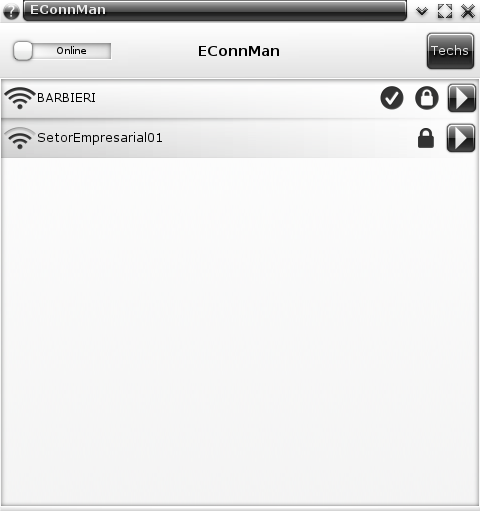
Today I'm releasing the first release of "econnman", the
EFL user interface for
ConnMan.
Some time ago raster added a ConnMan module to e17, but then the API broken during 0.5 transition and I rewrote that module. With ConnMan-1.0 the API was changed yet again and our module stopped working.
Lucas De Marchi took the task to revive the module and he is still finishing this task... let's say Enlightenment's internal widget set (e_widget) is something that can get everyone bored to death! Also the new ConnMan API requires an Agent interface to reply with passwords, usernames and other input that the manager may need. This code was not written before, so these new API and GUI must be written.
Until Lucas can finish his work I took a weekend to play with my favorite language: Python. I was away from Python-EFL for a while, so I was wanting to write some code using it. Python-DBus is super-simple (compare it to C!), so the EConnMan in Python-EFL was a nice thing to play.
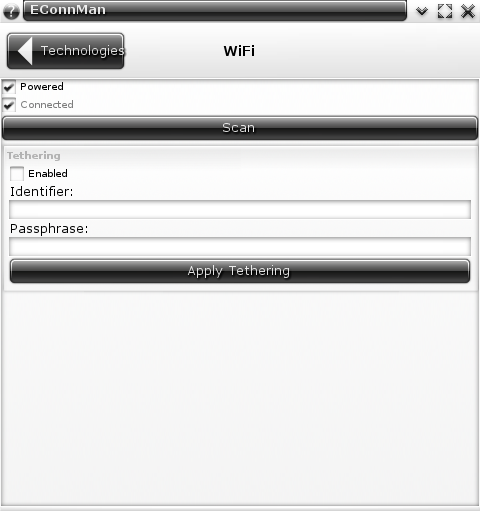
We'll cooperate efforts: E17 module will only provide the services list and allow to connect and disconnect. It will also provide an Agent, so we can provide passwords. Everything else that is related to configuration will be left to stand-alone "econnman" application. This standalone will do the tweaks and show details such as IP and MAC addresses, proxy, tethering and others.
In less than two days I had the base of the code I'm releasing now. It supports everything I need (IOW: it does not support VPN, Bluetooth-PAN or 3G/Cellular), but it's easy to extend to support new features....
so patches are welcome!
My delay to have it released was that I wanted to improve theme (both default and detourious) so it look better, as you can see in the screenshots. It's still not perfect, particularly the "Segment Control" used to show mutually exclusive options (DHCP, Static, Off) is damn ugly!
It also ships with an optional agent (--agent/-a command line option) that can be used until E17 gets a proper module with agent support.
Download:
Future:
Some people want IPv6, Proxy and VPN support. Those are nice ideas, but I personally don't need them. So I'd like some people that use them to step up and do the code... or at least push me to do them! :-P
Some people want to rewrite it in C and while I can sponsor the idea, it will be much more work for no real gain. With a Python version working one can do the conversion easily, even the helper structures and callbacks can be known beforehand...
- Post Date
- 2012-08-13 00:11
- Categories
- Tags
introduction and motivation
At
ProFUSION a common topic is how to optimze the system. Not just the speed, but also what and how it is done. Not just for our embedded systems, but also our desktops and laptops.
These discussions led us to be involved in projects that consider this goal, such as
Enlightenment,
ConnMan,
oFono and
systemd. With great projects, come great people and thus enlightening discussions on how to improve things. From these discussions
Lennart Poettering and
Kay Sievers put together a
A Plumber's Wish List for Linux, with one of the items being of special interest for ProFUSION as it had the potential of also helping embedded systems and speeding up or boots:
* module-init-tools: provide a proper libmodprobe.so from
module-init-tools:
Early boot tools, installers, driver install disks want to
access information about available modules to optimize
bootup handling.
One of the reasons for this is that udev will search /sys/devices for all "modalias" files and call "
/sbin/modprobe -bv $ALIAS", however many of these calls evaluate to an empty list, thus an useless execution of program that will open /lib/modules/`uname -r`/modules.*, load resources, search for something that is not there and return. This could be way cheaper if done inside udev workers.
[note: Lucas did measure and noticed 2.5x speedups, stay tuned for benchmarks]
kmod
Then our developer
Lucas De Marchi proposed to do the libmodprobe and we funded it. After some discussions with Lennart and Kay, it was decided to rename it to
kmod for shortness and good namespace. The initial goal was to achive a 1:1 replacement of module-init-tools as a library to be used by udev and systemd-modules-load and we are close to it with our
second release done today! While we miss depmod tool (planned for v3), our kmod-modprobe should be fully functional and if this proves to be true, the logic will move to libkmod to be used by udev.
we need your testing!
To ensure kmod-modprobe does what it is supposed to do, we need extensive testing, there is where we need you! Try it on as many systems as possibles and let us know. To do this we recommend:
$ git clone git://git.profusion.mobi/kmod.git
$ cd kmod
$ ./autogen.sh
$ ./configure --enable-logging \
              --enable-debug --enable-tools \
              --enable-zlib # if you have module.ko.gz
$ make all
$ sudo make install
$ sudo mv /sbin/modprobe /sbin/modprobe-bkp
$ sudo ln -s /usr/bin/kmod-modprobe /sbin/modprobe
$ ls -1 /sys/module/ > ~/original-modules
$ reboot
$ ls -1 /sys/module/ > ~/kmod-modules
$ diff ~/original-modules ~/kmod-modules
current users and feedback
Being a new project in a critical area of Linux system, we expected lots of criticism and rejection by people, but interestingly enough after
Lucas' announcement and
LWN article the feedback was highly positive! We even had some testers and people to help with ideas and experience.
Among the people that joined the project is the current maintainer of module-init-tools package
Jon Masters, which announced that
kmod replaces module-init-tools. He is helping a lot with his knowledge and cases from Red Hat Enterprise Linux, also providing modules from non-trivial platforms such as s390. Last but not least he provided insights to improve module handling on Linux, particularly replacing modules with better alternative as required in enterprise systems.
With Jon's blessing we'll use the same mailing list
linux-modules@vger.kernel.org and our git will move to kernel.org soon.
People from ARCH and Debian were also interested and even created packages for it! These guys were extremely helpful to test cases such as gzip modules, 64bits modules with i386 user space and so on. They are: Tom Gundersen (tomegun), Dave Reisner (falconindy) and Marco d’Itri (Md).
next steps
Based on our TODO, we have the following ideas for next steps:
- Finish libkmod-elf.c to provide information required by depmod. I'm working on this in my depmod branch;
- tools/kmod-depmod.c: create a 1:1 compatible tool to generate /lib/modules/`uname -r`/modules.*;
- libkmod should export parsed configuration to be used by kmod-modprobe.c --dumpconfig;
- create kmodmock library to be LD_PRELOAD'ed to redirect some syscalls such as init_module(), delete_module() and open() of /sys and /proc. I've started a branch for this some time ago as "unittest" branch but stopped due lack of ELF support at the time;
- create unittests and measure coverage. Given kernel modules are user-input they may be broken files and libkmod-elf.c needs to be extensively tested to avoid segmentation fault due out-of-boundaries access. This mean not trusting null terminated string in .strtab section and so on.
- create optimized modules.archive that would contain optimized search index and all modules compressed independently, but in the same file. This would save file access and could provide information we don't have today, like the uncompressed size of gzipped modules.
- Post Date
- 2011-12-21 18:23
- Categories
- Tags
Last week from 29-Sep to 01-Oct we had the amazing 7th PythonBrasil conference, for the first time in São Paulo.
Since I've start to use Python in 2002 I loved the language, but after getting introduced to the PythonBrasil community in 2004 I've boosted my development skills, got some friends and even my first job (INdT-Recife) was a kind recommendation from Osvaldo Santana in 2005.
By 2005 we had the 1st PythonBrasil Conference, then called PyConBrasil, here in Campinas with the help of UNICAMP and our amazing non-stop contributor Rodrigo Senra. It was very cool, I even presented a talk there... and it motivated me to go to following conferences in 2006 and 2007 as well.
However if starting to work at INdT reduced my spare time since late 2006, after ProFUSION was born in 2008 I had no time to participate in the lists or even go to conferences. What a shame!
I couldn't see how shameful it was until I did this PythonBrasil in 2011. I' m yet to see a conference with so kind people. People still remembered me and I was ashamed when I couldn't remind their names... although they did remember mine (
NOTE TO CONFERENCE: bigger names next year!) Some would even let me know they still use
Eagle-Py, something that I already forgot about. And people I had closer contact before were willing to talk as if we had met last week. Amazing.
During these talks I've catch up with Rodrigo Senra, Luciano, Osvaldo, Erico, Marco André, Sidnei, Fernando and many more I couldn't remember. However one of the talks was very special: talked to Gustavo Niemeyer about
Go programming language. That's right, people were so kind and open we had a keynote about Go, and we talked a lot afterwards without problems! :-P Gustavo showed me some nice details about the language and my mind is now burning! I must do Enlightenment Foundation Libraries (EFL) + Go = EGO, a perfect GUI tool.
But I was of use... not just a leecher! I went there to present 3 talks (slides in Portuguese!):
Last but not least, I'd like to thank everyone that did this amazing conference possible!
- Post Date
- 2011-10-06 21:00
- Categories
Lots of systems do not support multi-window on their own, consider standard Linux Frame Buffer (FB) or the PlayStation3. This makes it cumbersome as you're restricted to a single window, likely you'll have to rewrite your apps to behave well in this scenario.
Traditionally this problem is worked around by toolkits like Qt that provides
QWS, a great help for developers. Considering QWS I decided to help our PS3 friends with something similar which I shamelessly called
EWS (Ecore + Evas Single Process Windowing System).
Ecore and Evas already made 99% of this work: they abstract rendering, abstract windowing and so on. There is even support for "inlined windows" in Elementary, these are rendered to buffers that are visible inside other windows. Actually the first version of EWS was a 30min hack in Elementary called "eland" (making fun of wayland). But as not everyone would use Elementary it was better to move it lower in the stack: Ecore_Evas.
Ecore_Evas is a glue layer between Ecore and Evas that takes care to configure actual windows and setup Evas on them, to capture events from various sources and feed them to canvas, etc. If you cope with its API you'll work with most EFL libraries and applications out-of-the-box.
Ecore_Evas_EWS was created as a new engine that builds on top of others. It will use a backing-store engine like X11, FB, DirectFB, WinCE or PS3 to create an internal Ecore_Evas. Every new window created with
ecore_evas_ews_new() is rendered to an Evas using the buffer engine and its pixels end as the image source in the backing-store engine, displaying it. This is very similar to existing ecore_evas_buffer feature
ecore_evas_object_image_new(), however it will handle more things automatically.
Among the new features are events to allow window management. Things like "window created", "window moved" and "window resized" are placed in the main loop for interested peers, they may handle these and decorate the windows, offer window management (close, maximize, ...). To exemplify that I've added support in Elementary with basic controls such as move, maximize, restore and close. Unfortunately it looks ugly like hell and then I'm not posting any screenshot or screencast ;-) Let's wait for people doing themes to make a great work.
The work is far from complete, bugs remain, optimizations could be applied for OpenGL... if you consider the rules "20/80", 80% of the code was written in 20% of the time, now we'll take 80% to make it work for sure :-D But it's not bad considering it took me 2 days, 1421 lines in ecore_evas_ews.c, 543 in elu_ews_wm.c and 317 in ews.edc...
That's why I keep saying that EFL is an amazing technology to build products. It runs fast, it's slick and it does not get in the way. Give it a try! :-)
- Post Date
- 2011-10-06 00:51
- Categories
- Tags